|
|
 |
Group Affy ArraysGrouping Affy Arrays is the first step of the analysis pipeline. To Start a new session follow the instructions below. Remember that arrays from many different projects can grouped together
| Find the Analysis Tab | Follow the steps below to get to the page to start grouping together Affy files or Click the link
| 1) | Log into Sbeams
| |
| 2) | Select the Microarray Link in the main navigation bar
| |
| 3) | Select the Project of interest at the top of the page
| |
| 4) | Select the Data Pipeline Button on the main navigation bar
| |
| 5) | If the project has Affy data a link to "Affy Analysis Pipeline" will be displayed at the bottom of the page, Click the link
| |
|
| Start a new Analysis Session | | Click the Start New Analysis Session button to start selecting arrays. | 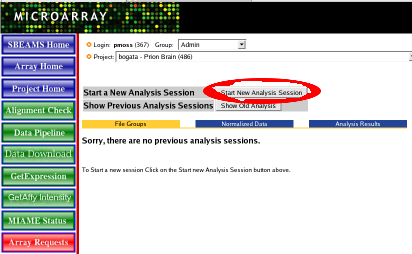 |
| Select Arrays | Click on the project of interest. Arrays within that project will show up below. Use the checkboxes to select the arrays for analysis. You can select arrays from different projects. T
| 1) | Click on any of the column headers to sort the rows
| |
| 2) | Click the check box at the top of the arrays to select/de-select all arrays
| |
| 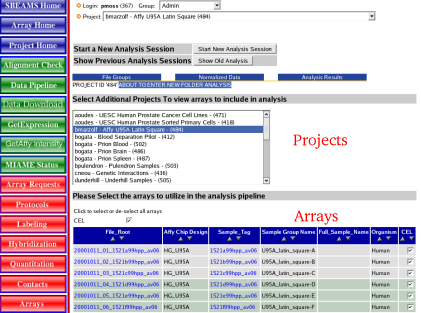 |
| View Selected Arrays | | As arrays are selected they will show up in the upper portion of the window. To add additional arrays go, select a new project and select the arrays of interest. | 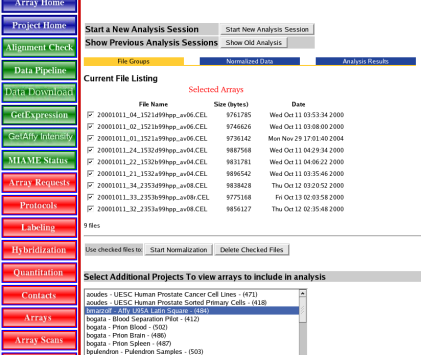 |
| Go to Normalization Section | | Once all the arrays are selected click on the "Start Normalization" button |
| Go Back to the Pipeline Overview | | Go Back to the Pipeline Overview |
|